Create a server to save connection settings (Local)
The Servers feature allows for the centralized storage of connection parameters (server address, credentials, database engine, etc.) . The location can be local or remote, and the supported databases are: SQL Server, SQL Express, MariaDB, PostgreSQL, and MySQL.
To create or modify a Server :
- File menu, then Organizations .
- On the Organizations page, click the context menu and select Servers :
- On the Servers page, click the New button
At the bottom left of the page, to create a new server, or double-click on an existing server to edit it:
- On the Server page, fill in the required fields:
- Cheel Account : The Cheel account in which the server is created.
- Name : Name used to identify this server configuration.
- Database engine : SQL Server, MariaDB, MySQL, or PostgreSQL. In this example, SQL Server Express is used.
- Server : The name or IP address of the computer or server on which the database engine is installed, followed by the database instance. In our example, the SRV-DATA\SQLEXPRESS instance corresponds to the default name when installing SQL Server Express on a machine named SRV-DATA.
- Port: Optional, specify a database manager port number if it is different from the default port.
- Additional settings : Optional, additional connection settings.
- Username and Password : Credential information. The button to the right of each field
allows you to enter your credentials.
- Allow the creation of organizations : Enabling this checkbox allows the creation of organizations on this Server.
- Confirm the Server by clicking OK .

To create an organization connected to your local database manager:
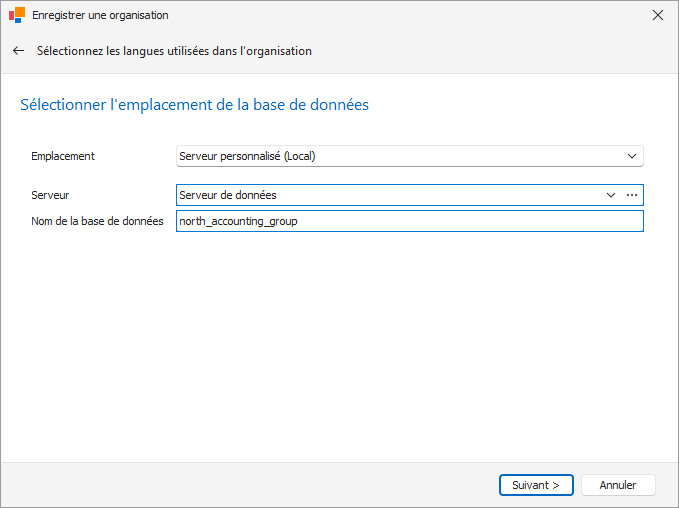
In the Database Location step of the Organization Creation Wizard, select Custom Server (Local) as the location, and then choose the relevant server :
For more information on creating an organization, click here .