Electronic transmission of annual statements
This type of transmission allows annual payroll statements to be sent to social security funds and tax authorities via the Swissdec standard. The following documents are concerned:
- Annual statements to the funds: AVS, CAF, IJM, LAA, LAAC, LPP.
- Salary certificates to the cantonal tax authorities.
Step 1 – Check the configuration and perform a communication test.
For this step, refer to the article Testing the Swissdec configuration before transmission .
Step 2 – Submit the payroll statements to the social security funds
- View the page for annual electronic declarations: menu Salaries , Electronic transmission of statements , Annual electronic declarations .
- Add a statement using the New button
Then complete the following information:
- Swissdec configuration : Select the current version (e.g., Swissdec 5.0).
- Year of calculation : Select the relevant year (e.g., 2025).
If necessary, enable the following options: - Substitution : Check if you are replacing a statement already submitted.
- Annual statement to replace : Select the statement to replace (field activated only if Substitution is checked).
- Test count : Check only for a test submission without legal value.
- In the list of recipients, check the boxes to which the data should be sent.
- Click on the Submit Declaration button.
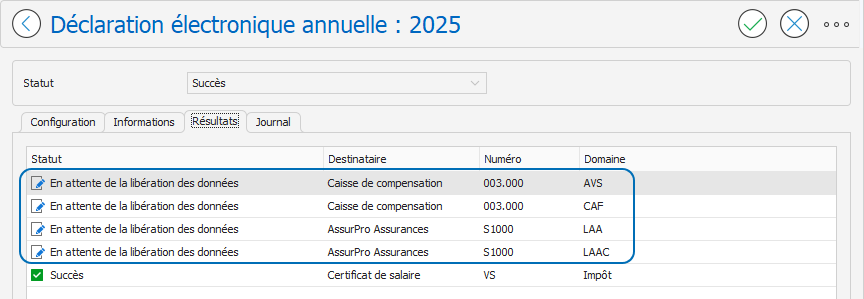
- Once the count has been submitted, the Results tab automatically appears and indicates the status of each count:
The statutes may be as follows: - Success : Successfully completed. No further action is required.
- Data release pending : Release required on the cashier's website.
- In Process : Currently being processed. Click the Retrieve Status button to refresh the information.
- Swissdec processing error : Incorrect count.
- Pending : Validation postponed.
- Ignored : The count must be submitted manually.
Step 3 – Release the data
For certain statements (AVS, CAF, IJM, LAA, LAAC, LPP), data release is required. In this case, the message "Pending data release" appears in the Status column of the Results tab.
To release the data from a count:
- Double-click on the line of the relevant statement.
- On the Annual Electronic Filing Results page, click the Release Data button in the bottom left corner:
- The browser opens the cash register login page. The username and password are already filled in. Click on Login .
- A summary of the transmitted data will be displayed. Verify the information and complete it if necessary. The presentation and steps may vary depending on the cash register. Then click the data release button.
- A validation receipt in PDF format can be downloaded once the data has been released.